An AI-generated historical photo is not a photograph of the past. It is a new image assembled in the present. That distinction sounds obvious—until the image is cropped out of its original post, stripped of its label and reposted with a precise date, place and emotional story.
Then an illustration can start to behave like evidence.
The safest way to judge a supposed historical photograph is not to ask whether the grain looks convincing. Ask whether you can trace the image to a credible record that identifies who made it, what it shows, where and when it was created, and how that information is known.
What counts as an AI-generated historical photo?
The label covers several different things that should not be treated as equivalent:
- A fully invented scene: a generator creates an event, person or place that was never photographed.
- A reconstruction: AI visualizes a real event for which no photograph exists, ideally with an explicit label.
- Generative restoration: software fills damage, sharpens faces or reconstructs missing areas with pixels that were not captured by the camera.
- Colorization or animation: AI adds color, motion, expressions or speech to a still historical source.
- A real photo with a false caption: no synthetic pixels are required; the image is misleading because the claimed identity, date, place or event is wrong.
A labeled reconstruction can be legitimate editorial art. A restored scan can help readers see a damaged source. The problem begins when the distinction between record and interpretation disappears.
How a false past spreads
A false historical image rarely needs to fool an archivist. It only needs to survive a quick scroll.
Vintage style borrows documentary authority
Black-and-white tones, film scratches, formal clothing and an old-fashioned border feel like evidence because we associate them with archives. Image generators can reproduce those signals without reproducing any real event.
That creates a dangerous shortcut: it looks old, therefore it is old. But age is not a visual effect. It is established by provenance, cataloging and context.
Precise captions create false confidence
“Paris, 1923” feels more credible than “an old street.” A full name, neighborhood and date can make a synthetic image sound researched even when every detail was invented after generation.
A caption is a claim about an image, not proof of that claim. Even a genuine photograph can be paired with the wrong person, decade or event.
Reposts detach the image from its disclosure
The first uploader may write “AI reconstruction.” A later account downloads the image, crops out the label and adds a sentimental story. Another repost cites the previous post rather than a museum, newspaper or archive. Repetition then creates the appearance of documentation while the citation chain leads only to social media.
This is especially compatible with AI slop: nostalgia is emotionally immediate, cheap to generate and easy to recycle. The image can feel true before anyone asks whether it is sourced.
Search results can inherit the mistake
Once the same false caption appears on many pages, image search can return a wall of agreement. Ten copies do not equal ten sources. They may all descend from one unsourced post.
That is why the goal of reverse-image search is not to count matching captions. It is to escape the repost loop and find the earliest credible record.
Real archive photograph vs. AI-generated “history”
The comparison below uses the Wright brothers’ first powered flight because it has a strong archival trail. The Library of Congress notes that Orville Wright positioned the camera and John T. Daniels squeezed the shutter-release bulb as the Flyer took off on 17 December 1903. Its catalog record identifies the event and date, the call number LC-W86-35, and the Digital ID ppprs.00626.
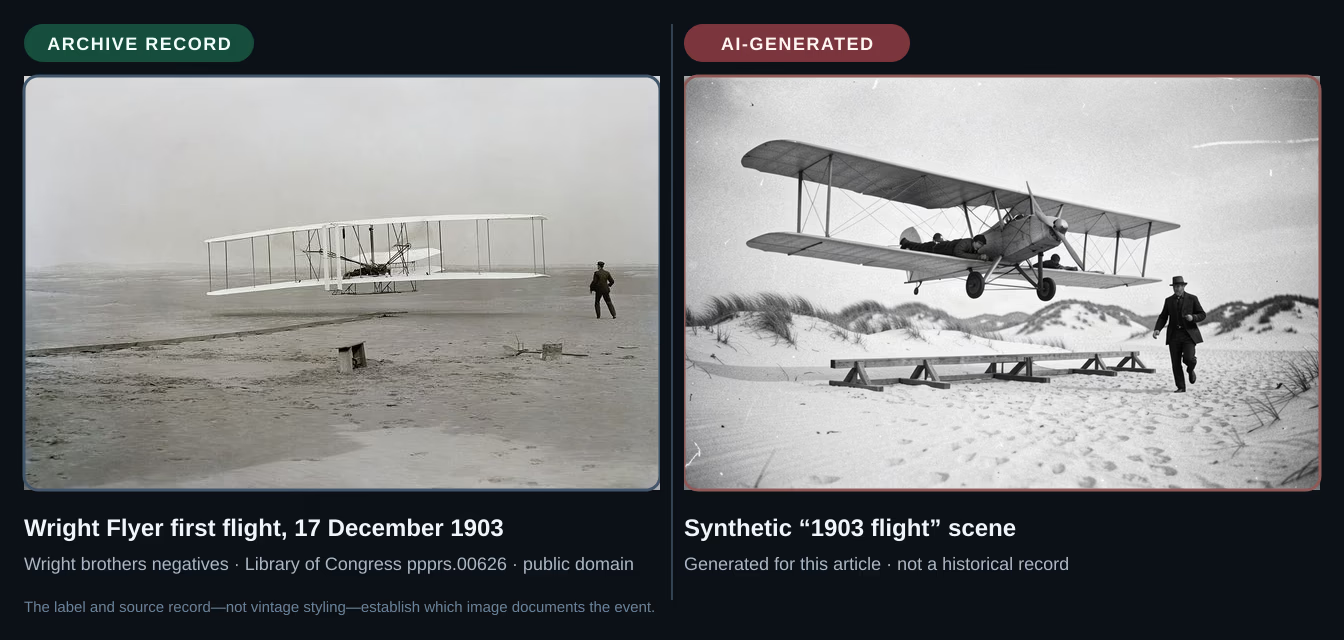
The AI panel looks old at a glance. It has monochrome grain, dunes, period clothing and a fragile aircraft. It also depicts a later, conventional tractor biplane with a front-mounted propeller and wheels—not the open-frame 1903 Wright Flyer with twin rear-mounted pusher propellers and skids.
Those visual errors are useful clues, but they are not the decisive difference. A future model could render the aircraft correctly. The real panel remains stronger because its claim connects to a photographer, date, collection, catalog identifier and surviving negative. The record—not the sepia mood—does the authenticating work.
This is also why “real” does not mean “untouched.” The Commons version is a digitally restored scan: rotation, cropping, dust and damage corrections are documented on its file page. It still derives from a real photographic negative. The AI panel derives from a prompt.
How to verify a supposed historical photo
Use a source-first workflow. Pixel inspection comes later.
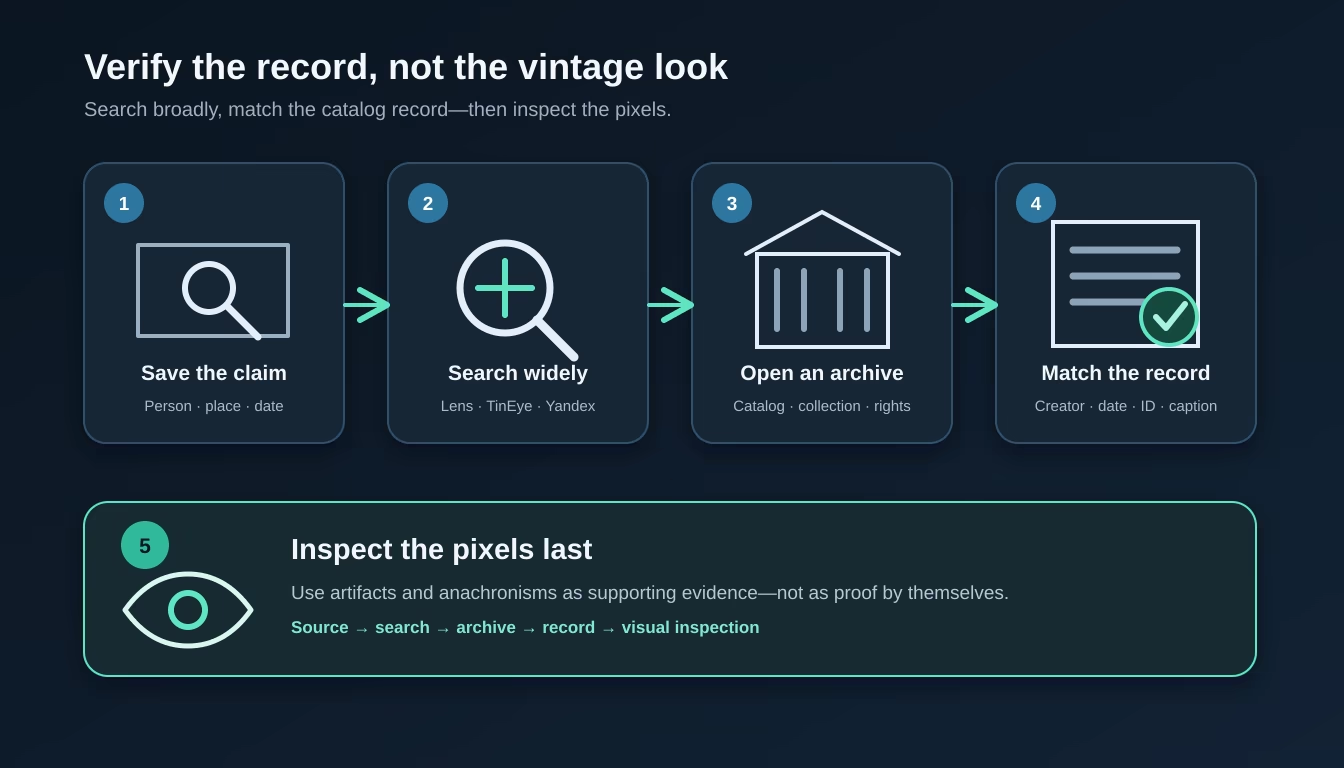
1. Save the complete claim
Before searching, write down what the post says:
- Who is supposedly pictured?
- What event is happening?
- Where and when did it happen?
- Who supposedly took the photograph?
- Does the post name a collection or provide an identifier?
Save the caption or URL as well as the image. A search result can help verify the file while leaving the caption untested.
2. Search with Lens, TinEye and Yandex
Google’s official help page explains that you can search with an image using Google Lens by uploading a file, dragging it into the search box, using an image URL or selecting an image on a web page.
For a historical claim:
- Upload the full image first.
- Crop to a distinctive face, building, vehicle or object if the results are noisy.
- Add the claimed name, date or location as search terms.
- Open promising matches rather than trusting the result snippet.
- Look for a museum, library, archive, newspaper or agency record—not merely an earlier-looking repost.
Google Lens is often called “Google reverse image search,” but it is not a certificate of authenticity. It can surface visually similar images, altered copies and pages that reused the same false caption.
Use more than one reverse-image index
Different indexes may surface different copies, so do not stop after one Lens search. TinEye lets you sort results by Oldest to put the images its crawler found earliest at the top. TinEye’s sorting documentation is explicit that this is the date TinEye first found the file—not the date it was created or first published. Treat it as a lead to inspect, not proof of origin.
Yandex Images provides another visual-search index and may return matches that Lens or TinEye did not surface. Repeat the full-image search and the most distinctive crops across more than one service, then compare where their result trails lead.
Google’s “About this image” feature adds more than an approximate first-seen date. Its official documentation describes an Early uses section that highlights pages found much earlier than other displayed results, plus How the image was made or edited details when available. Google’s image-details documentation says those details can draw on IPTC fields and provenance signals such as C2PA or SynthID.
These are useful context, not self-authenticating proof. Google warns that credit and digital-source metadata can be modified, while “first found” dates describe a search engine’s own index rather than the image’s true creation date.
3. Open the catalog record
A credible archive record should let you test several parts of the claim. Look for:
- title and description;
- creator or photographer;
- date or date range;
- collection name;
- stable catalog identifier;
- physical format or negative information;
- rights and reuse statement;
- notes about cropping, restoration or uncertain identification.
The Library of Congress guide to photographic evidence advises researchers to assess photographs and captions as they would textual documents, seek original records, weigh the evidence and determine whether subject, date, place and context fit.
A polished website is not automatically an archive. The strongest records explain where the object came from and make uncertainty visible instead of hiding it.
Where to search for the actual record
Start with the place, institution or publisher most likely to hold the original. These are practical entry points:
- United States: Library of Congress Prints & Photographs and the National Archives Catalog.
- Across Europe: Europeana Collections, which searches material contributed by European cultural institutions.
- Germany: the Bundesarchiv image database.
- Netherlands: the Rijksmuseum collection.
- United Kingdom and conflict history: Imperial War Museums Collections.
- News and editorial photography: Getty Images’ archival collection and AP Newsroom. Access or licensing may be restricted, but their captions can identify an event, photographer or source collection.
- Broad discovery: Wikimedia Commons. Follow the file page’s source link back to the holding archive rather than treating Commons itself as the final authority.
For an alleged “Naples, 1910” photograph, for example, search Europeana with the place, decade and subject, then follow promising records to the contributing Italian museum, library or archive. Search the catalog’s own language and alternate place names where possible.
4. Corroborate the historical details
Compare the image with independent evidence from the same period:
- Does the building exist in that form at the claimed date?
- Do clothing, insignia, vehicles or street furniture fit the location and decade?
- Is the named person documented as being there?
- Do contemporary newspapers, maps or diaries describe the event?
- Are there other photographs from the same sequence or collection?
In 2024, AAP FactCheck documented a Facebook page publishing fabricated “historical” images, including false depictions of Henry Ford and the Wright brothers. The fact-checkers compared faces, machines and period details with genuine historical records. That combination—reverse tracing plus subject knowledge—is stronger than an AI detector score.
5. Inspect the pixels last
Anachronistic machinery, malformed hands, repeated faces, inconsistent lettering and impossible geometry can support a conclusion. They should not carry it alone.
Visual tells age quickly. A clean image can be synthetic; a scratched or strangely exposed image can be real. Our AI-image detection guide covers visual inspection, while the tells that stopped working explains why fingerprints such as bad hands and garbled text no longer provide dependable verdicts.
Provenance tools can add evidence too. A valid Content Credential or SynthID result may support a claim about origin, but missing provenance proves little after screenshots and platform processing. See our guide to SynthID and Content Credentials for those limits.
When reverse-image search fails
A search with no useful matches is not a positive AI test. Several ordinary situations can produce silence:
- the synthetic image is newly generated and has not been indexed;
- a real photograph exists only in a physical or poorly indexed collection;
- the file was cropped, mirrored, recolored or heavily compressed;
- the available scan is too small or visually degraded;
- search engines have not connected the copy to its catalog page.
Treat “no match” as unverified, not “fake.” Search the written claim separately, try another crop, search a specialist archive and ask whether the account can provide its source.
Restoration is not the same as invention
Historical photographs have always been repaired, retouched, cropped and reproduced. The practical boundary is not “edited versus untouched.” It is whether the process preserves a traceable source and clearly documents where interpretation enters.
Conventional restoration may remove dust, repair a tear or rebalance fading. Generative tools can go further by inventing a missing hand, rebuilding a face, guessing color, extending a scene or creating motion between frames. The output may be plausible without being recoverable from the original evidence.
Responsible presentation should therefore:
- keep the unaltered scan available;
- label restored, colorized, animated and reconstructed versions;
- document what tool or process changed;
- avoid describing generated detail as recovered fact;
- link back to the holding archive or source record.
A 2026 York University archive essay on AI and historical photographs makes the same core distinction: synthetic depictions are not primary sources, and historical claims should remain transparent and traceable.
The stakes are not limited to charming street scenes. In 2026, the Arolsen Archives and memorial institutions called for action against AI-generated Holocaust distortions, warning that fabricated imagery can trivialize victims, confuse evidence and feed revisionist narratives. A false past can be profitable engagement bait, but it can also alter how real people and events are remembered.
A quick historical-photo verification checklist
Before sharing a remarkable “old photo,” ask:
- Claim: Does the caption name a person, place, event and date?
- Origin: Can I find the photographer, collection or publisher?
- Record: Is there a stable archive identifier and rights statement?
- Search: Do reverse-image searches lead to a source or only to reposts?
- Context: Do period details agree with independent evidence?
- Alteration: Is restoration, colorization or AI reconstruction disclosed?
- Corroboration: Does another credible source support the event and caption?
- Uncertainty: If the chain breaks, am I treating the image as unverified rather than filling the gap with a guess?
The rule is simple: a convincing picture is not the same thing as a documented photograph. To practise these checks on current AI images too, try our free AI literacy training.
Frequently asked questions
How can I verify whether a historical photograph is real?
Trace it to a credible archive, museum, library, newspaper or agency record. Match the claimed person, place, date, creator, catalog identifier and caption, then corroborate the event with an independent source.
Can Google reverse image search prove that a historical photo is authentic?
No. Google Lens can find copies, earlier appearances and related images, but a match may lead only to another repost. Treat reverse-image search as a route to the source, not as proof by itself.
What if a reverse-image search finds no matches?
No match does not prove that an image is AI-generated. The file may be new, cropped, mirrored, colorized, poorly indexed or held in an offline collection. It means the claim still needs other evidence.
Are AI-generated historical images always misinformation?
No. A clearly labeled reconstruction, classroom illustration or artistic interpretation can be useful. It becomes misleading when it is presented as a photograph of a real event—or when its disclosure disappears during reposting.
Can AI restoration invent details that were not in the original photograph?
Yes. Generative inpainting, face enhancement, colorization and animation can add plausible detail that the camera never recorded. Keep the original available, label the altered version and document what changed.