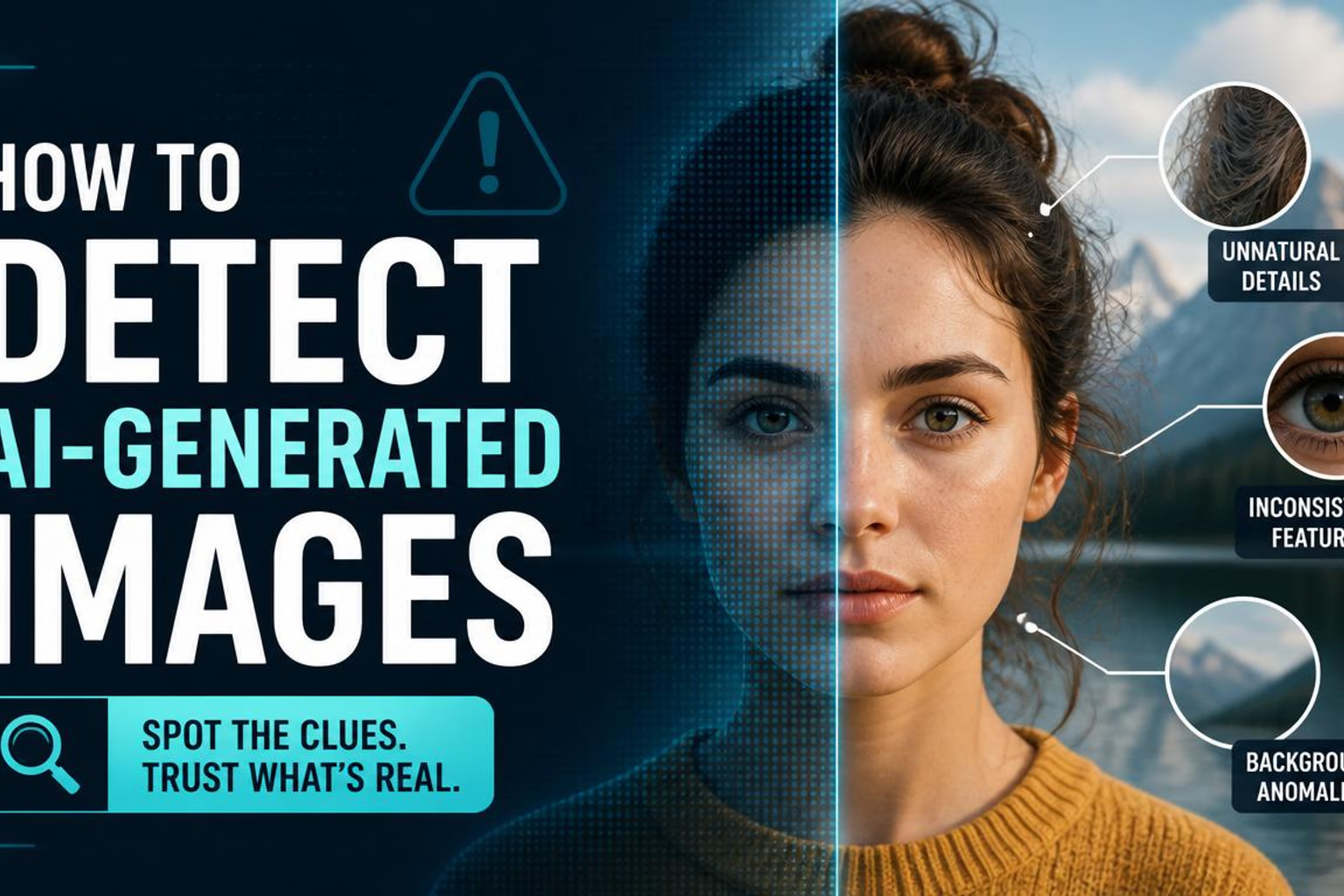
How to Detect AI-Generated Images
A visual guide with numbered annotations on real AI images — so you can see exactly which pixels give them away.
Disclosure: some links on this page are affiliate links — if you sign up through one, we may earn a commission at no extra cost to you. This never affects our rankings or test results.
Why AI Images Are So Hard to Spot in 2026
The jump from 2022-era Stable Diffusion to today's models is enormous. Early AI images had obvious problems: distorted faces, six-fingered hands, melting backgrounds. Modern models have solved most of the surface-level problems. A single portrait generated by GPT Image 2 or FLUX.2 can be indistinguishable from a professional photograph to an untrained eye.
The reason they've improved so fast is scale: these models are trained on billions of images scraped from the internet. They've learned what "a realistic photo" looks like in a statistical sense. But they've learned it as a distribution of pixels — not as an understanding of physics, anatomy, or how the real world works. That gap between statistical plausibility and physical reality is where the tells live.
AI models are also inconsistent under scrutiny. A generated image may look perfectly realistic when you glance at the subject, but fall apart completely when you examine the background, or the hands, or the text on a sign. Real photographs are coherent at every scale — the closer you look, the more real detail you find. AI images reveal their nature when you start asking questions the model never considered.
Annotated AI Image Examples
Below are 2 AI-generated images with numbered circles marking every detectable flaw. Each number corresponds to an explanation on the right. The real photo is shown as a small thumbnail for direct comparison.
Man playing guitar on the street
Musical instruments have precise, well-documented geometry. A guitar neck, headstock, and body shape must conform to real designs. AI learns the gestalt of "guitar" from training images but cannot reconstruct the exact proportions — the instrument always looks slightly wrong.

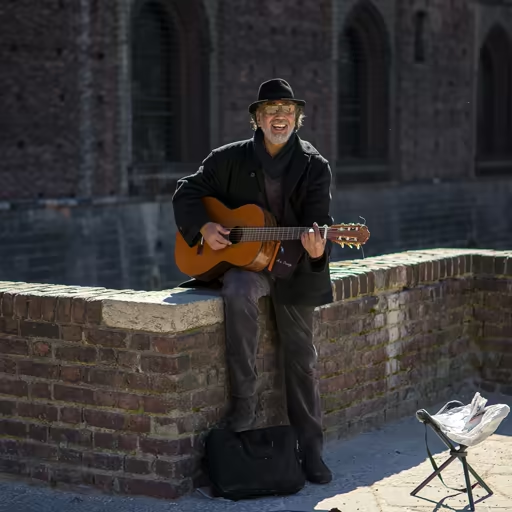
What gives it away
The body of the guitar has an incorrect silhouette — the waist contour, lower bout, and overall proportions don't match any real guitar design. AI models reconstruct instruments from training distribution rather than from a precise geometric template, so the shape looks guitar-like but not actually correct.
The end of the guitar neck — the headstock — is malformed. Real headstocks have a precise arrangement of tuning pegs in a consistent pattern (3+3 or 6-in-line). In this image the headstock either merges with the background, has the wrong shape, or the tuning machines are incorrectly placed or missing.
The building behind the musician has architectural inconsistencies — window grids that don't align to a structural grid, walls with perspective that doesn't converge to a consistent vanishing point, and surface details that look like a texture rather than real masonry or cladding.
Cars on the highway
Vehicles are one of the hardest subjects for AI to fake convincingly. Real cars have precise make-specific silhouettes, and every registered car carries a readable license plate. AI has no knowledge of either.
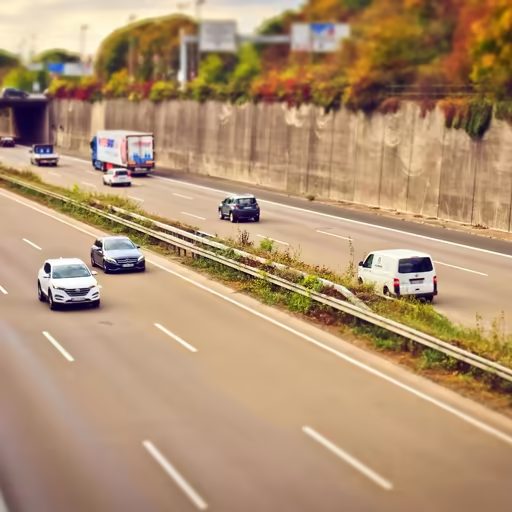
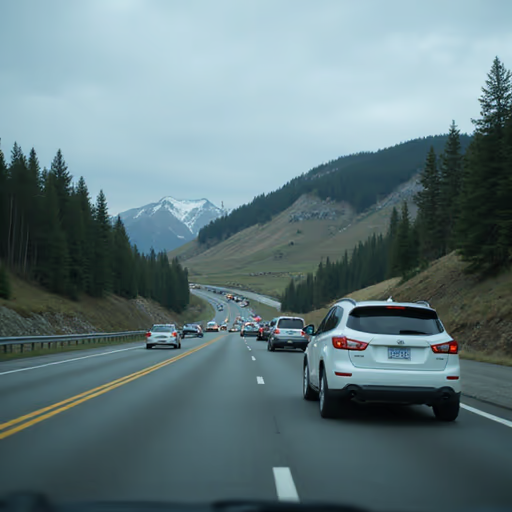
What gives it away
None of the vehicles are identifiable as a real make or model. Real highway photos show cars with distinct silhouettes — a Golf looks different from a 3-Series. AI generates generic "car-shaped" forms that blend design language from many manufacturers into something that belongs to none of them.
License plates are illegible — the characters are blurred, invented, or form no recognisable national format. Real plates have consistent fonts, spacing, and country-specific formatting that diffusion models cannot reproduce faithfully. This is one of the most reliable tells in any vehicle image.
Lane markings on real motorways follow strict legal standards — consistent dash lengths, fixed intervals, precise alignment. AI-generated road surfaces often have markings that curve, fade inconsistently, or vanish mid-lane without reason.
The 6 Most Reliable AI Tells
These patterns appear across all major AI image generators — from Stable Diffusion to GPT Image 1.5, and they are what a typical generated image still gets wrong. Worth knowing: several once-famous giveaways — counting fingers, garbled signage — have largely been fixed by newer models. We cover which ones in the AI tells that stopped working.
Where this guide stops working. None of the tells below is guaranteed. A first-try output from a current model usually still leaks one of them — but someone who re-prompts, regenerates and paints over the weak spots can produce an image with no visible artefact left. At that point visual inspection genuinely cannot decide it, and neither can a detector. Our own players average about 80 % on faces, which means roughly one in five gets past a practised eye. Treat the checks below as evidence, not proof: they can show an image is AI, and they can never show it is real.
Faces: too perfect, or subtly cloned
AI models converge on an idealised "default face" when generating people. A single portrait can look flawless — but in group scenes, everyone shares the same bone structure, hair texture, and expression. Individual faces are also subtly wrong at close range: pupils may be asymmetric, ear cartilage simplified, and the specular highlight in the eye placed inconsistently with the light source. Look for: identical-looking people in groups; eyes that look slightly painted; ears that lack inner structure.
Zoom into the eyes. Real eyes have complex corneal reflections that mirror the actual light source.
Contact points: where two things meet
Counting fingers is no longer the tell it was — modern models get hands right in the overwhelming majority of outputs, and a clean hand now proves nothing. What survives is the harder version of the same problem: models render objects well and negotiate the boundary between them badly. Look where a hand grips a mug, a shoe presses into grass, a person sits on a chair, or one figure touches another. Objects float a millimetre off the surface, merge into each other, or cast no shadow at the join. Hands still fail here too — overlapping fingers, a complex grip, a partially hidden hand — but as a contact problem, not a counting one.
Find every point where two surfaces meet and zoom in. Does the pressure look real — does the grip deform the object, does the foot displace the grass? A hand with five correct fingers that hovers around a handle is the modern version of this tell.
Dense text: the more words, the weaker the model
Text used to be the universal giveaway. It no longer is at short lengths — GPT Image 2, FLUX.2 and Nano Banana all render a headline, a logo or a shop sign cleanly, so a legible sign proves nothing on its own. What still breaks is <em>volume</em>: a paragraph of body copy, a restaurant menu, a page of newsprint, a wall of small print. Models produce text as a visual texture rather than from a character model, and the illusion holds for a few words and collapses over a few dozen. Numbers in strict formats — country-specific licence plates, IBANs, dates on documents — fail for the same reason.
Ignore the headline, find the smallest and longest passage in the frame and try to actually read it. Gibberish there is strong evidence of AI; a clean short sign is no evidence of anything.
Reflections: generated independently from the scene
Reflections are physically determined — they must mirror the exact geometry, colour, and brightness of what is above or beside them. AI generates scene content and reflective surfaces as separate elements of a composition. The result is that reflections in water, car paint, glass windows, and eyes rarely correspond to what should actually be reflected. Water in AI images often looks like a patterned texture with decorative highlights; car bodies show generic bright smears where you'd expect to see the sky and surrounding environment.
Look at water reflections: they should show a mirrored version of the sky and objects directly above. If they show something different — or nothing at all — the image is AI.
Backgrounds: plausible at a glance, wrong in detail
AI models generate backgrounds as a supporting texture for the main subject, not as a coherent three-dimensional space. This means: buildings with windows that don't align to a structural grid; roads with lane markings that curve or disappear; foliage that looks like a surface texture rather than individual leaves. Perspective is often subtly wrong — multiple vanishing points that don't correspond to a real camera position. Real backgrounds reward scrutiny; AI backgrounds punish it.
Check building windows: do they form a regular grid? Check road markings: do they align with the road direction? If not, you're looking at AI.
Textures: too perfect, too uniform
Real materials are imperfect. Fabric has uneven weave and wear. Skin has pores, minor blemishes, and variation in pore size across different parts of the face. Stone has irregular joints and weathering. Fur and feathers have individual variation at the level of a single strand or barb. AI generates textures as smooth, tiling patterns — consistent in a way that no real surface could be. This is especially visible in close-up shots of animals (feathers, fur), food (pastry layers, bread crumb), and clothing (fabric weave).
Zoom into any textured surface. Real texture has fractal complexity — you find more detail the closer you look. AI texture becomes a smooth, repeated pattern.
Quick Checklist: What to Check in Any Suspicious Image
Run through this list whenever you encounter an image you're unsure about. The more boxes you tick, the more confident you can be — but a single strong tell is often enough.
How the Major AI Models Compare
The four vendors below are the ones setting the standard for photorealistic generation, and they are the models most likely to be behind an image you cannot place. Knowing which one you are dealing with — if you can tell — narrows down where to look.
The weak spots listed are tendencies observed in each model's output, not fixed properties — a later version or a retouched generation can close any of them. For how often each model actually fools people, see our measured model ratings.
AI Image Detection Tools — Do They Work?
Several tools claim to automatically detect AI-generated images. They work by analyzing statistical artifacts left by the generation process — noise patterns, frequency distributions, and other signals invisible to the human eye. Here's an honest assessment:
On older models (SD 1.5, DALL-E 2), automated detectors work reasonably well — the generation artifacts are strong enough to be reliably detected. Accuracy can be 80–90% on these outputs.
On current models (GPT Image 2, FLUX.2, Nano Banana, Seedream 4.5), detection accuracy drops significantly — often to 60–70%, barely better than chance in some studies. The models have improved fast enough to outpace detector training data.
There's also a cat-and-mouse dynamic: as detectors improve, models are trained to avoid producing the patterns detectors look for. This arms race means no automated tool can be considered reliable without continuous updates.
C2PA content credentials (a new industry standard for labeling AI-generated content) are starting to appear in outputs from OpenAI, Adobe, and others. When present, they reliably indicate AI origin — but they can be stripped by saving or re-uploading the image.
Bottom line: Automated detection tools are a useful first pass, not a definitive answer. Visual inspection using the tells described in this guide is more reliable for high-quality fakes — and the only method that works across all models.
Beyond a detector score
Practise the full verification workflow
A detector can provide one signal, but it cannot check the source, context or intent behind an image. The free awareness course turns those checks into a repeatable process for images, video and voice.
Start the free awareness course →Test What You've Learned
Two images per round — one real, one AI-generated. Pick which is real, then see the exact tells revealed with annotations, just like the examples above. 5 rounds, covering people, food, animals, and more.
Start the Quiz →Free · No account needed · 5 rounds with full annotations
Frequently Asked Questions
What are the easiest ways to spot an AI-generated image? ▾
Start with dense text: a paragraph, a menu, a page of newsprint. If it dissolves into shapes under inspection, the image is almost certainly AI-generated — though a short, clean sign or logo proves nothing on its own, because those now render correctly. Next, check contact points: where a hand grips an object, a foot meets the ground, or two people touch. Counting fingers is no longer worth much — modern models get hands right most of the time — but the boundary between two surfaces still breaks. Finally, in scenes with several people, look for clone-like facial uniformity.
Can AI detectors automatically identify fake images? ▾
Automated AI detectors exist (Winston AI, Hive Moderation, Illuminarty) but their accuracy against state-of-the-art 2026 models is often only 60–70%. They are more reliable against older Stable Diffusion-era images. Use them as a first signal, not a definitive answer. Visual inspection using the tells described in this guide is more reliable for high-quality fakes.
Are newer AI models harder to detect than older ones? ▾
Yes — significantly. GPT Image 1.5 and Flux Pro produce images that are dramatically harder to detect than 2022-era DALL-E or Stable Diffusion. The same weak spots are still the ones to check first — license plates, complex group anatomy, physically accurate reflections, consistent background geometry — but they are now tendencies rather than guarantees. A single generation usually leaks one of them; someone who re-prompts and retouches until none of them shows can produce an image that visual inspection cannot decide.
What are the most reliable tells in 2026 that still work? ▾
Dense text is the strongest — a paragraph, a menu, a page of newsprint still dissolves under inspection, though short signs and logos now render cleanly and prove nothing on their own. Physically accurate reflections are a close second: water, glass and car body reflections that match the actual scene remain difficult for every current model. Contact points are the third — where a hand grips an object, a foot meets the ground, or one person touches another, because models render objects well and negotiate the boundaries between them badly. Complex crowd scenes with consistent anatomy throughout are also revealing. All of these are odds rather than certainties — they tell you where to look first, and an image that survives every check is still not proven real.
Does image compression hide AI detection artifacts? ▾
Yes — platforms like Twitter/X, Instagram, and WhatsApp aggressively compress images, which can destroy or obscure low-level frequency artifacts that automated detectors look for. High-quality JPEG or original-resolution images are always better for both visual and automated analysis.
Can AI-generated images fool forensic image analysis? ▾
Often yes. Tools like ELA (Error Level Analysis) and noise analysis were designed for detecting photo manipulation (cloning, splicing) rather than full image synthesis. They produce unreliable and often misleading results on AI-generated images. Metadata analysis (checking for EXIF data) can be useful — real cameras embed detailed metadata, while AI images typically have none or very minimal metadata.
What is C2PA and does it help identify AI images? ▾
C2PA (Coalition for Content Provenance and Authenticity) is a technical standard for embedding "content credentials" into images — a cryptographically signed record of how an image was created. OpenAI, Adobe, and other companies have begun embedding these credentials in AI-generated images. When present, they reliably indicate AI origin. However, they can be stripped simply by taking a screenshot or re-saving the image, so absence of C2PA credentials doesn't mean an image is real.
How can I get better at detecting AI images? ▾
Practice with immediate feedback shows you which checkable flaws still turn up — merged objects, reflections that contradict each other, broken text — and how often current images have none at all. It will not make looking reliable on the newest models, so treat what you see as a first signal: for anything you would share or act on, check the source, run a reverse image search and read detector results with care. Our quiz mode above shows the annotation markers on each AI image after your guess.
Practice With More Categories
Each category trains a different set of detection skills — variety is key.