
Luma vs Pika (2026): Quality, Pricing & Watermarks
Disclosure: some links on this page are affiliate links — if you sign up through one, we may earn a commission at no extra cost to you. This never affects our rankings or test results.
Watermarks, realism, pricing and use cases compared.
Luma delivers more physical correctness and cinematic output. Pika has a social media focus — Instagram Reels, TikTok and so on.
Luma's public pricing lists trial credits but does not publish a recurring free plan or stable trial-export terms. Pika's Free plan is listed without a visible watermark, but it includes 0 monthly credits, so you must buy a credit pack before generating.
In this guide we show you the difference between these two AI video generation providers. We take a look at pricing, realism, style and use cases.
Side-by-Side Comparison
| Feature |  Luma Ray3.2 Luma Ray3.2 |  Pika Pika |
|---|---|---|
| Entry credits | Trial credits; no recurring free plan listed | 0/month (credit packs only) |
| No-cost output | Depends on current trial terms | None without a credit pack |
| Credits refresh | No recurring free allowance listed | No free monthly credits |
| Max length at entry | Not publicly stated for trial credits | 5–10 sec |
| Watermark at entry | Verify in current trial export | ✓ No |
| Login required | Google or Apple only | |
| Entry model | Ray3.2 current | Pika 2.5 |
| Output style | Cinematic, realistic | Artistic, stylized |
| Image-to-video | ✓ Yes | ✓ Yes |
| Paid plans from | $30/mo (monthly payment) | $10/mo (monthly payment) |
| Commercial use | From $30/mo — paid plan only | From $35/mo (Creator) — paid plan only |
| Best for | Quality-first content | Beginners, no visible watermark |
The Story Behind Luma
Luma was founded in 2021 in California. The original idea was to provide a 3D scanning app for smartphones. With the use of NeRF technology you scanned your 3D object — the app sent the images to the server, and the AI calculated a 3D model based on the 2D images. The whole process worked very well, and even complicated things like mirroring and light reflection looked good.
Since 2023, Luma has built services beyond scanning — first text-to-3D, then the AI video generator this comparison is about.
The Entry-Access Problem
Luma's public pricing lists paid plans starting at $30/month and says trial credits are included; it does not list a recurring free plan. The company's model information names Ray3.2 as current and calls Dream Machine deprecated. Pika publishes an account tier called Free, but it likewise provides 0 monthly credits and requires purchased packs.
Luma Pricing
Luma's paid plans start at $30/month or $300 billed yearly, above Pika's $10/month entry plan. Luma may still make more sense for creators who prefer its cinematic output.
Pros
- ✓ Most cinematic output quality
- ✓ Realistic physics and motion
- ✓ Current Ray3.2 model
- ✓ Strong image-to-video
- ✓ Excellent for landscape & nature
Cons
- ✗ No recurring free plan listed
- ✗ Trial limits and export terms not transparent
- ✗ Entry plan is above Pika ($30 vs $10/mo)
- ✗ Less beginner-friendly
Pika — Early Focus on Video Generation
Back in 2023, the founder started with the idea of building a video generation model for different styles like anime or 3D. They developed their models further and added, for example, a physics engine in 2026. Pika is famous and widely used to generate social media clips, marketing content or animations.
With a very simple interface, Pika is easy to use, especially for non-techies.
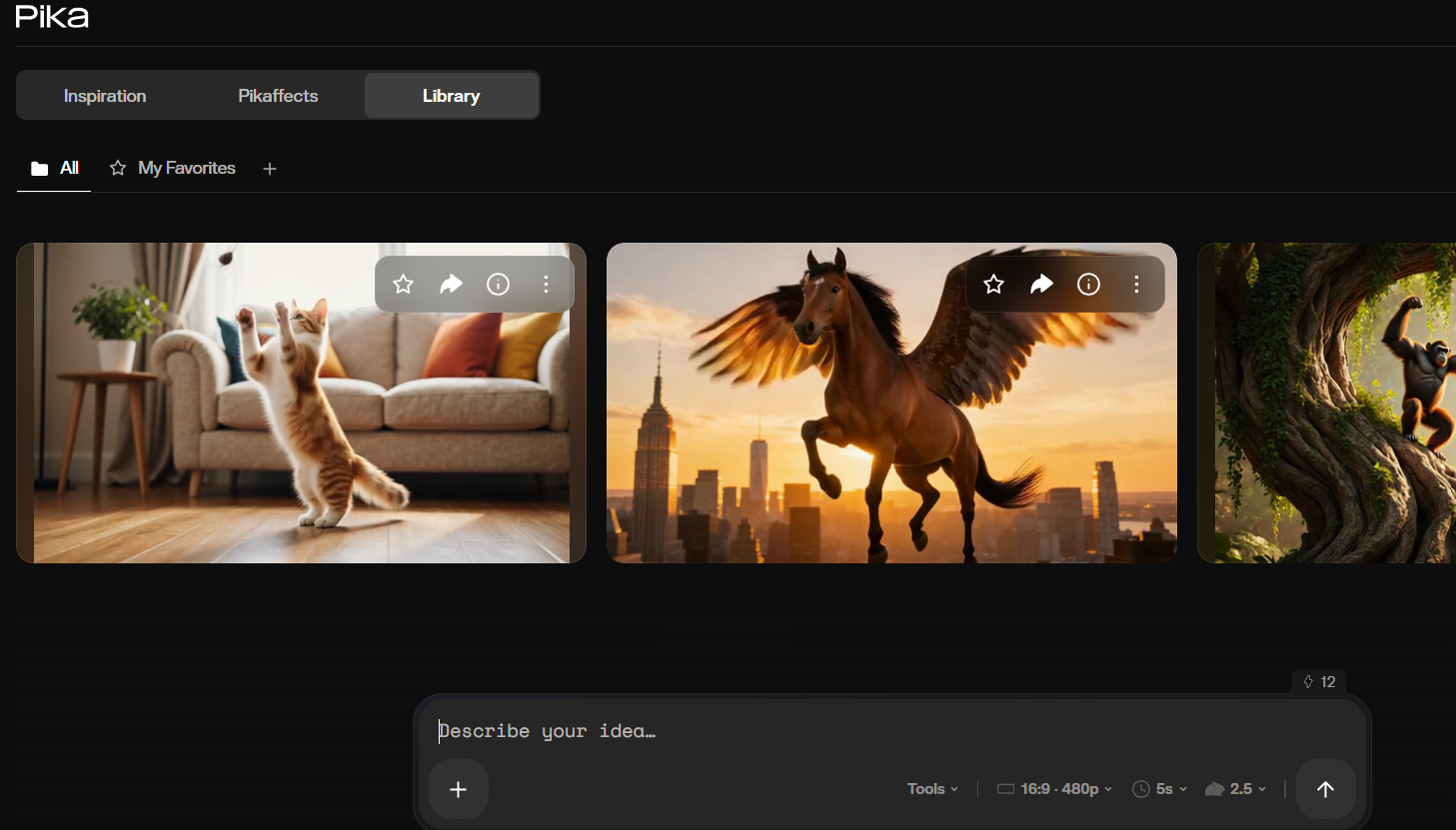
Just simply type your prompt and get a result in minutes.
Pros
- ✓ No visible watermark on the Free plan
- ✗ No monthly free credits (credit packs only)
- ✓ Easiest interface to learn
- ✓ Up to 10 sec video length
- ✓ Lower entry price ($10/mo)
Cons
- ✗ Only 480p on free
- ✗ Not photorealistic
- ✗ Free generations require a purchased credit pack
- ✗ Recognizable "Pika glow" style
Video Quality Comparison
Winner: Luma
Luma's physics simulation and environmental rendering are noticeably more believable. Lighting stays consistent, subjects move with natural weight, and outdoor scenes read as genuine.
Depends on use case
Luma = cinematic and grounded. Pika = stylized with a luminous glow. Neither is objectively better — the right choice depends on the aesthetic your content requires.
Slight winner: Luma
Luma better preserves the original image's lighting and spatial coherence when animating. Pika's image-to-video is functional but more stylized.
Winner: Luma
Luma remains the stronger choice for cinematic realism. Pika prioritizes simpler, stylized output without a visible watermark, but generation requires purchased credits.
Best Tool for Different Use Cases
| Use case | Winner | Why |
|---|---|---|
| No-cost, watermark-free output | Neither confirmed | Pika requires purchased credits; Luma's current trial-export terms are not public |
| Instagram Reels | Pika | No visible watermark; stylized look works well for social |
| Quality-first content | Luma | Clearly more cinematic and realistic output |
| Beginners | Pika | Simpler interface and clear pay-as-you-go pricing |
| Nature & landscape | Luma | Environmental realism is Luma's strongest category |
| Budget-conscious paid | Pika | $10/mo vs $30/mo for Luma |
Pricing Comparison (2026)
Luma
- Trial credits; no recurring free plan listed
- Plus $30/mo
- Pro $90/mo
- Ultra $300/mo
Pika
- Free: 0 credits/month (credit packs only)
- Starter $10/mo
- Creator $35/mo
- Lower entry price
Is Luma Better Than Pika?
For output quality: Luma wins. Luma remains stronger for cinematic realism, while Pika prioritizes simpler, stylized generation. If you care about how realistic the video looks, Luma is ahead.
For lower-cost entry: Pika wins. Its Free plan has no visible watermark and its Starter subscription is cheaper, but generating on Free requires a purchased credit pack.
The simplest rule: choose Pika for a simpler pay-as-you-go workflow; choose Luma when cinematic realism matters more than entry price.
FAQ
Is Luma better than Pika?
Luma produces more realistic, cinematic output. Pika is more approachable for beginners and its Free plan has no visible watermark, but that plan includes 0 monthly credits, so generation requires a purchased credit pack. For quality-focused creators, Luma wins; for a simpler pay-as-you-go workflow, Pika is more practical.
Does Pika have a visible watermark on the free plan?
No — Pika lists its Free plan without a watermark. However, the plan includes 0 monthly credits, so you must purchase a credit pack before generating.
What is the Pika glow?
The 'Pika glow' is a characteristic luminous, slightly soft aesthetic that appears in Pika-generated videos — subjects have a gentle glow around their edges. It makes Pika output easily recognizable but can be an advantage for stylized social content.
Does Luma have a recurring free plan?
Luma's public pricing lists paid plans starting at $30/month and says trial credits are included; it does not list a recurring free plan. Luma's model information names Ray3.2 as current and calls Dream Machine deprecated.
Which AI video generator is better for beginners?
Pika is significantly easier to get started with. The interface is simpler, no visible watermark means you can publish without a tool logo in the corner, although the free plan no longer includes monthly credits (credit packs only). Luma requires more technical understanding to get the best results.
Scene consistency is what separates these two
Watch whether a scene still holds together in the last frame. That is where both models tend to slip.


Related