logo - what is real quiz Which one is real?

Real or AI Elements Video?

AI video models can now generate strikingly realistic fire, water, and wind footage. Two clips per round — only one is real. Can you spot the difference?
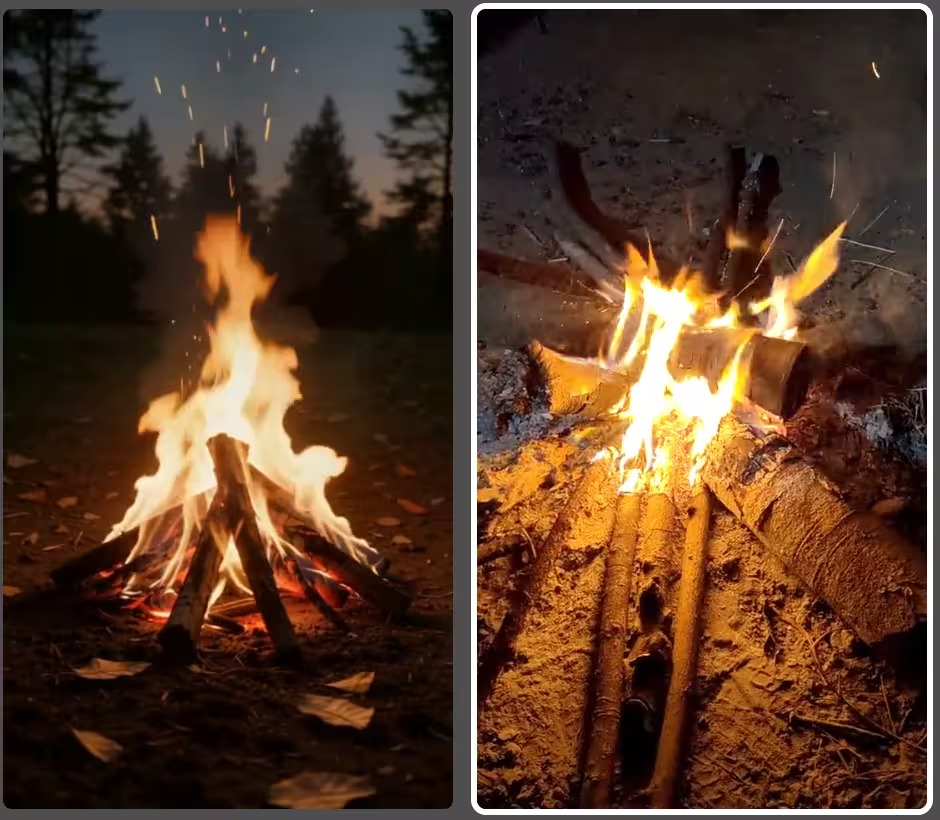
How the Elements Video Quiz Works

Each round shows you two short video clips side by side — one is real footage of a natural element (fire, water, wind, etc.), the other was generated by an AI model. Your job: tap the man-made (real) video.

After you answer, both videos keep looping so you can study what gave the AI away — or what made it so convincing.

Why Elements Are the Ultimate Test for AI Video

Faces and animals are hard for AI, but fire, water and wind are hard in a fundamentally different way. They are chaotic systems — turbulent, non-repeating, governed by fluid dynamics that no model can memorise the way it memorises what a cat looks like. A generator can learn the appearance of a flame, but it has to invent plausible motion for every single frame, and that is where the cracks appear.

The tell that beats almost every model: look at what the element does to its surroundings, not just the element itself.

What to Check, Element by Element

🔥 Fire

Real flames flicker irregularly and throw dancing, uneven light onto everything nearby — a face, a wall, the ground shift brightness constantly. AI fire is often beautiful but too rhythmic, and frequently forgets to light its surroundings. Watch the embers too: real sparks drift on unpredictable air currents; AI sparks tend to rise in suspiciously uniform arcs.

💧 Water

Water has weight. Real splashes displace, droplets separate and fall, and foam forms and dissolves with turbulence. AI water often looks like slow-motion syrup, loops subtly, or produces spray that never quite lands. Where water meets a surface — a rock, a shoreline — is the fastest place to catch the fake.

🌬️ Wind

Wind is invisible, so you judge it by its effects: leaves, grass, hair and fabric all moving inconsistently because gusts are uneven. AI tends to move everything together, at one uniform speed, as if a single slider controls the whole scene — a dead giveaway once you know to look for it.

Which AI Video Models Are Used?

The quiz features state-of-the-art AI video generators applied to natural phenomena:

  • Veo 3 — Google DeepMind's flagship video model. Produces extremely realistic footage with accurate lighting and physics simulation. Particularly convincing for waterfalls and flowing water scenes.
  • Seedance 1.5 Pro — ByteDance's cinematic video model. Optimized for smooth motion and near-photorealistic output, used here for ocean waves and campfire scenes.
  • Wan 2.6 — Alibaba's open-weight video model. Strong scene coherence and natural color grading. Used for close-up nature shots like flowers in wind.
  • Grok Imagine — xAI's video generator. Produces coherent motion but can trail top-tier models in texture realism, especially on mechanical or airborne subjects.

Tips for Spotting AI-Generated Elements Video

  • Watch fluid motion closely — real water and fire have chaotic, unpredictable movement; AI tends to smooth it out too much
  • Check fine particle detail — sparks, droplets, and smoke particles often look too uniform or perfectly rendered in AI footage
  • Notice lighting on surroundings — real fire and water cast dynamic, irregular light; AI lighting can feel static or overly consistent
  • Look at background elements — AI backgrounds sometimes drift or lose detail at the edges during motion
  • Check for loop seams — AI clips sometimes have a visible artifact at the loop point where motion resets unnaturally


Frequently Asked Questions

Why are fire and water so hard for AI video to fake?

Fire, water and smoke are turbulent, chaotic systems — no two frames repeat, and their motion is driven by fluid dynamics that are effectively impossible to memorise. AI models learn what these elements look like, but tend to average out the chaos, producing motion that is too smooth, too regular, or subtly loops. Real footage keeps surprising you frame to frame.

What is the single best tell for AI-generated elements footage?

Watch how the element affects everything around it. Real fire throws flickering, irregular light onto nearby surfaces; real water displaces, splashes and drips with weight; real wind moves leaves and hair inconsistently. AI often renders the element convincingly but forgets to make the surroundings react to it correctly.

Which AI models generate the element clips?

The quiz pairs real footage with clips from Veo 3, Seedance 1.5 Pro, Wan 2.6 and Grok Imagine — each applied to the natural phenomena they handle best, so you are tested against current state-of-the-art video generation.

Is the elements video quiz free?

Yes — completely free, no signup and no app. Each round shows two looping clips; pick the real one and play as many rounds as you like in your browser.

More Quiz Categories